

If you follow the steps and meet all the requirements, the process of closing a Mashreq Neo account is very easy. Mashreq Neo is a digital banking platform popular in the UAE, managed by Mashreq Bank, that provides financial services that are branch-less, with a mobile-first approach. But the user can make a decision to terminate his account as his money needs change, he moves, or switches to another bank. Here’s a guide that will tell you what you need to know, the steps you need to take in preparation, how to close it, time frames, costs, and frequently asked questions.
What is Mashreq Neo Account?
Overview of Digital Banking in UAE
Mashreq Neo is a 100% digital bank account to manage finances via the mobile app. It eliminates the need for traditional banking processes, providing convenience, speed of execution, and accessibility.
Key Features of Mashreq Neo
- No minimum balance requirement
- Instant account opening
- Free debit card
- Mobile-based transactions
- Bill payments and transfers
- Real-time notifications
These features make Mashreq Neo ideal for tech-savvy users, freelancers, and professionals who prefer digital banking solutions.
Reasons to Close a Mashreq Neo Account
There are several reasons why users choose to close their account:
- Switching to another bank with better services
- Account inactivity
- Unsatisfactory customer support
- Relocation outside the UAE
- Security or privacy concerns
- Managing multiple bank accounts
Understanding your reason helps determine whether closure is necessary or if alternative options may be more suitable.
How to Close Mashreq Neo Account (Step-by-Step Methods)
You can close your Mashreq Neo account in several ways, which you could consider depending on your convenient method. The following are the three best methods, presented in a simple, structured, and step-by-step format.
Method 1: Close Mashreq Neo Account via Mobile App (Fastest Method)
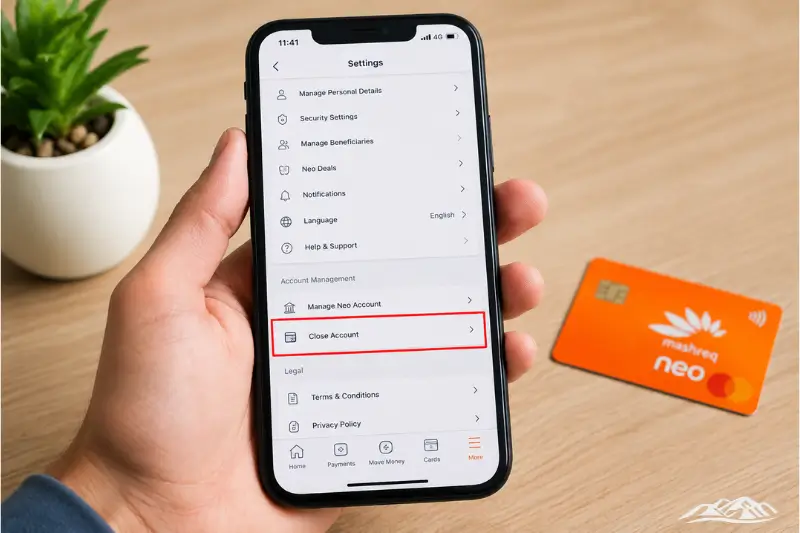
This is the quickest and most recommended method since Mashreq Neo is a fully digital banking platform.
Step-by-Step Instructions:
- Open the Mashreq Neo Mobile App
Launch the app on your smartphone (Android or iOS). - Log In to Your Account Securely
Enter your username/password or use biometric login (fingerprint/Face ID). - Go to Account Settings
Tap on the profile icon or menu and navigate to “Settings” or “Account Services.” - Find the “Close Account” Option
Scroll down and select “Close Account” or “Account Closure Request.” - Review Important Instructions
The app may show a checklist (zero balance, no pending transactions, etc.). - Confirm Your Request
Follow on-screen prompts and confirm using OTP (One-Time Password). - Submit the Closure Request
Tap on “Submit” to finalize your request.
What Happens Next?
- You will receive a confirmation notification (SMS/email/app alert)
- The bank will start processing your request
- Account closure usually completes within 2–7 working days
Pro Tip:
Make sure your account balance is 0 AED before submitting the request to avoid delays.
Method 2: Close Mashreq Neo Account via Customer Support

This method is ideal if:
- You cannot access the app
- You are facing technical issues
- You prefer speaking to a representative
Step-by-Step Instructions:
- Contact Mashreq Neo Customer Support
Call the official helpline or use in-app chat support. - Verify Your Identity
Provide required details such as:- Emirates ID
- Registered mobile number
- Account information
- Request Account Closure
Clearly inform the agent that you want to close your Mashreq Neo account. - Follow Instructions Provided
The representative may:- Ask you to clear the balance
- Confirm no pending transactions
- Guide you through final steps
- Receive Confirmation
You will get a reference number or confirmation message for tracking.
What Happens Next?
- Your request is processed manually
- Closure timeline: 3–7 working days
Pro Tip:
Always ask for a closure reference number for future follow-up.
Method 3: Close Mashreq Neo Account via Email Request
This method is useful if you prefer written communication or cannot access phone/app services.
Step-by-Step Instructions:
- Compose a Formal Email Request
Use a clear subject line like:
“Request to Close Mashreq Neo Account” - Include Required Account Details
Mention:- Full name
- Registered mobile number
- Account number (last 4 digits for security)
- Attach Identification Documents (If Required)
Example:- Emirates ID copy
- Request Confirmation of Closure
Clearly ask for written confirmation once the account is closed. - Send Email from Registered Email Address
This helps speed up verification and processing.
You Also Get more : Finance information
Things to Do Before Closing Your Mashreq Neo Account (Important Checklist)
Immediately before you start the account closure procedure, you must take a couple of vital steps to ensure that it is carried out properly. Being well prepared will prevent postponements, non-acceptance, or unforeseen monetary problems. In case you wish to close your account with Mashreq Neo, you can do so with ease by ensuring that you tick all of the items on the following checklist
1. Clear Remaining Balance
If you are happy to cancel your account, please ensure that your account balance is $0.00. The remaining amount should be moved to another bank account and out in case of need. If there is even a small residual left in the account, then the request to close the account may not happen. Check for pending cashback, refunds, and reversals that may be issued in the near future, as they are also taken into consideration. One of the most essential parts for successful closing of an account is to make sure that there is a zero balance.
Account Closure Eligibility Criteria
| Criteria | Minimum Requirement | Maximum Limit | Ideal Value |
| Account Balance | 0 AED | 0 AED | 0 AED |
| Pending Transactions | 0 | 2 | 0 |
| Active Auto-Debits | 0 | 5 | 0 |
| Linked Financial Products | 0 | 3 | 0 |
| Account Age (Days) | 30 | — | 90+ |
2. Cancel Linked Services
Your Mashreq Neo account may include several services like utility payments, subscriptions, and automatic payments. When closing your account, please make sure to trim the cords of all these related services. That would include cancelling Auto-Pay for any bills, streaming services, loan payments,s or other insurance premiums. Eligible for service and payments may be denied upon account closing, and/or penalties may stem from such if services continue after account closure. For this, make sure to update the payment information with an active account at least a couple of days before.
3. Deactivate Debit Card
Another important step is to deactivate or block your debit card. Because your debit card is linked directly to your account, without it you could be at risk of being charged or having charges placed without your knowledge. The card could be easily blocked via the Mashreq Neo mobile app as well as customer support. After the card is disabled, it is advised to physically cut the card up and delete all of the details from online shopping sites and mobile wallets such as Apple Pay and Google Pay. This will provide 100% security until the account is closed.
4. Download Bank Statements
Close out accounts carefully, downloading and keeping bank statements and transaction history! You may access this information no longer after closing the account. These journals might come into a useful resource for the future, such as for tax purposes and even financial monitoring or legal reasons. To download statements for the preceding 6-12 months and securely store them on your device, cloud storage, or email. If you have backup financial records on hand, you won’t have any inconvenience later.
5. Check for Pending Transactions
Last but not least, you’ll have to check your account for possible pending or set-up transactions. This means payments made, incoming payments transferred, refunds, salary payments deposited, or cheque payments cleared. When account closure is considered, if some transactions are still going on, the account closure request may be postponed or declined. To make sure of all the transactions you made, it’s best to wait a couple of working days. Ensuring that no activities are outstanding will allow you to complete the closure of the account without being interrupted.
Documents Required for Account Closure
- Registered mobile number
- Account verification details
- The name of the Debit Card (if any)
Clarifying information will make the closing process go smoothly.
Processing Time for Account Closure
The closure process usually takes:
| Process Stage | Time Estimate |
| Request Submission | Instant |
| Verification | 1–2 working days |
| Final Closure | 2–7 working days |
Delays may occur if there are pending transactions or verification issues.
Charges
In most cases, closing a Mashreq Neo account is free. However, some conditions may apply:
| Fee Type | Approx. Cost |
| Account Closure Fee | 0 AED (usually) |
| Early Closure Charges | May apply |
| Card Replacement Charges | If applicable |
Always confirm with customer support to avoid unexpected charges.
What Happens After Closing Your Account?
When your account has been completely closed:
- Your account has been completely closed.
- Debit card is cancelled and withdrawn. The debit card is cancelled and taken back.
- The mobile app is limited and only available in specific areas.
- The remaining balance (if any) is settled
- A confirmation message or e-mail appears
Care should be taken to preserve this confirmation in the records.
Common Issues During Account Closure
1. Pending Transactions
Delay in collectibles due to unsettled payments.
2. Outstanding Balance
If there is a balance, they need to be paid down before closing.
3. Verification Failure
Proper data otherwise may lead to rejection.
4. Technical Issues
When someone makes an error or we experience connection issues, the customer service team can be a net gain that might assist us.
Can You Reopen a Closed Mashreq Neo Account?
Yes, there is every chance of reopening in most cases, but:
- If you didn’t register previously, you have to do it again.
- Approval is determined by bank policies.
- Only current account data is restored; the previous account data is not at your disposal.
When a building or facility is not closing, consider using these alternative options.
Alternative Options Instead of Closing
- Temporarily suspending the account.
- Keeping it inactive
- Changing into an account type
If, for whatever reason, you cannot decide to close for good, the following options may be useful.
Contact Mashreq Neo Support
Please contact us using one or more of the following:
- In-app chat support
- Customer care hotline
- Email support
Help is on hand to support you throughout the closure and to deal with any problems.
Conclusion
It’s easy to close your Mashreq Neo account if you follow the right procedure. App/Email/Customer Support is the mode you can use to close it; the key is that you have the balance settled and the services cut. However, the process can go smoothly without delay with adequate preparation. Digital banking is expanding in the UAE, and it’s important to learn how UAE bank accounts are managed, such as their closure, to understand how to get a secure and effective financial advantage.
Must Visit: PPC NBAD Balance Check – Prepaid Card Enquiry Guide
Cancel Your FAB Credit Card | Step-by-Step Process, Requirements, and Important Things to Know
Etisalat Quick Pay Guide 2026 Easy Bill Payment Recharge and Tips
FAQs
How do I close a Mashreq Neo account online?
It can be closed via the mobile application and also by going to customer support.
Is there any fee for closing the account?
In most cases, there is no fee charged unless there are special circumstances.
Is it possible to terminate my account without going to a branch?
Mashreq Neo is indeed a digital bank and is able to be closed online.
So what happens to the balance that is left after taking out my loan?
Should be transferred/withdrawn before closure.
Does it take a long time for the account to close?
Normally 5-12 working days.