

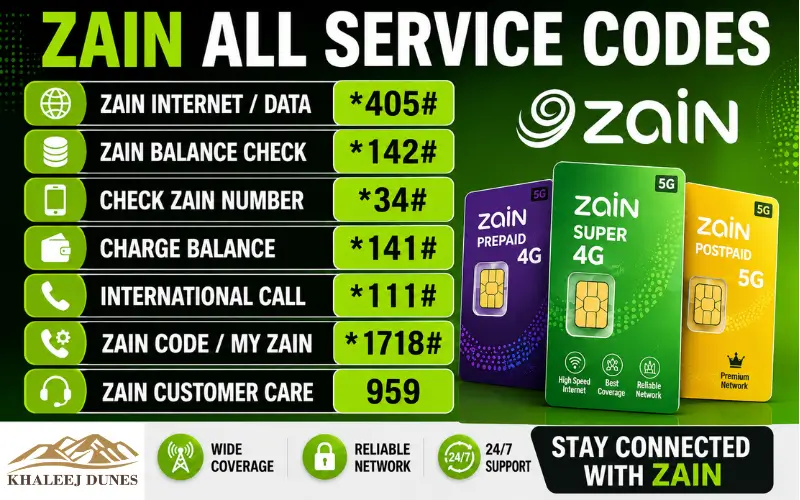
With the help of a simple USSD command, Zain all-service code enables subscribers to access important mobile services quickly. You can balance, top up your SIM, enable internet, voice, SMS packages, check how much balance and minutes are left, edit your account and reach customer support without an internet connection by using these codes. This guide offers you an exhaustive list of Zain’s frequently used service codes, their meanings and how to use them for routine mobile account management.
Many of the users are looking for complete list of USSD commands that are active for all their account management. These short codes offer quick and easy methods to manage your mobile account, from balance enquiries to roaming services.
Zain is based in multiple countries; many of its services are offered via similar USSD menus. Please note that the codes may vary depending on the Zain network in your area. Hence it is always advisable to verify country-specific codes on the official Zain website or customer care if there is no response as expected from the service.
What are Zain Service Codes?
Zain service codes are Unstructured Supplementary Service Data (USSD) codes used to interact directly with the Zain mobile network. Once a code is dialed, the network prompts users for information or presents choices in a menu for use, without needing to use mobile data or wireless connections.
Unlike the mobile apps, USSD codes are free of mobile phone configuration and can be used by virtually any cell phone, regardless of its brand or model, even basic feature phones. They can be very handy when you’re in a situation where you need to do something quickly and don’t have an internet connection available.
These service codes are used for various common services, such as checking your account balance, activating internet packages, subscribing to calls, checking data left, recharging prepaid accounts, and calling customer support.
Why People Use Zain USSD Codes
Most subscribers are using service codes as simple, reliable and accessible services around the clock. After dialing a short code, you’ll get a real-time answer back from the network without having to log into an application. Some of the biggest advantages include:
- Fast account management
- No internet connection required
- Works with all cell phones
- Easy package activation
- Quick balance inquiry
- Instant service confirmation
These features make USSD codes one of the easiest methods of managing a cell phone account.
Common Zain Service Codes
The following table lists some of the most commonly used Zain service codes and explains what each one is used for.
| Service | USSD Code | Purpose |
| Main Services Menu | *111# | Access all Zain services |
| Balance Check | *142# | Check prepaid balance |
| Recharge | 141Voucher Number# | Recharge your account |
| Internet Packages | *240# | Browse available data plans |
| SMS Packages | *123# | View messaging offers |
| Voice Packages | *140# | Check call bundles |
| Remaining Data | 1162# | View internet balance |
| Remaining Minutes | 1161# | Check available voice minutes |
| My Number | *178# | Display your Zain number |
| Customer Care | 107 / 959 | Contact customer support |
These codes cover the services that most subscribers use every day. Instead of remembering separate activation procedures, you can simply dial the required USSD command and follow the instructions displayed on your screen.
Also visited: Etisalat Quick Pay Guide 2026 Easy Bill Payment Recharge and Tips
Voice Package Codes
Zain provides different voice packages to people who call a lot from local or international numbers. Subscribers can subscribe to voice offers and browse for offers by sending USSD codes rather than relying on various methods for facilitating the activation of individual plans.
Note: Voice package codes vary by country. In many Zain networks, dialing *140# or accessing the *111# menu allows you to view available voice packages.
| Code | Service | Description |
| *140# | Voice Packages | View and activate available call bundles. |
| *116*1# | Remaining Minutes | Check your remaining voice minutes. |
| *111# | Main Menu | Open the voice package menu and other services. |
Voice bundles work well for customers calling frequently and looking to save on calling expenses. You’ll be able to see plans for calling every day, every week, every month, or for unlimited calls from the menu, depending on the country you’re in.
SMS Package Codes
Despite the fact that messaging apps are widely popular, SMS continues to play a crucial role in verifying OTPs, banking alerts, business communication, and personal messaging. The SMS service menu enables subscribers to subscribe to text message bundles without having to go to a service center.
| Code | Service | Description |
| *123# | SMS Packages | View available SMS bundles. |
| *116*2# | SMS Balance | Check remaining SMS balance (where supported). |
| *111# | Main Services | Access SMS package options. |
Daily, weekly, and monthly SMS bundles may vary depending on your local Zain operator.
Internet Package Codes
Internet packages are among the most frequently activated Zain services. Whether you need a small daily bundle or a large monthly plan, the internet menu lets you compare available options before subscribing.
| Code | Service | Description |
| *240# | Internet Packages | Browse available data plans. |
| *116*2# | Data Balance | Check your remaining internet balance. |
| *121# | Data Offers | View additional internet offers (available in selected countries). |
Many subscribers searching for Zain all service code specifically want quick access to these internet-related USSD commands because they are used almost every day.
Recharge and Balance Codes
Checking your balance and recharging your account are among the most basic services available through USSD.
| Code | Service | Description |
| *142# | Balance Check | Displays your available prepaid balance. |
| *141*Voucher Number# | Recharge | Add prepaid credit using a recharge voucher. |
| *143# | Last Transactions | View your recent recharge or balance transactions. |
After a successful recharge, the network immediately confirms the updated balance through an SMS or on-screen message.
Account Management Codes
Zain also provides several USSD commands that help subscribers manage their mobile accounts without contacting customer care.
| Code | Service | Description |
| *111# | Main Services | Opens all available Zain services. |
| *178# | My Number | Displays your Zain mobile number. |
| *113# | Tariff Plan | Check your current tariff or package. |
| *959# | Line Management | Access account management services. |
These codes are especially useful when changing plans or verifying account information.
Roaming Service Codes
If you are traveling internationally, roaming services help you continue using your Zain number without changing your SIM card.
| Code | Service | Description |
| *962# | Roaming Menu | View available roaming services and packages. |
| *111# | Main Menu | Access roaming options where available. |
The rates of roaming charges also vary from place to place, so it is advisable to check packages available before you travel. A lot of tourists who travel to UAE opt for roaming bundles to maintain connectivity without paying the conventional international rate.
Other Useful Zain Codes
Zain offers a number of other USSD codes for the convenience of its customers, apart from the services listed above.
- *700# – Gift service to eligible Zain users.
- *145# – Enables or disables Freeze Service (applicable markets).
- 107 – Customer Care.
- 959 – Customer Care (some countries).
These extra services enable the customer to facilitate special features of the accounts without using the Zain application.
Also Visited: Etisalat Monthly Data Package UAE – Plans, Cost and Subscription Steps
How to Use Zain Service Codes
Zain USSD codes are very easy to use and only take a few seconds to use. You don’t need internet connection or Zain mobile application to use these codes. Here are some steps to follow:
- Open the Phone or Dialer app on your mobile phone.
- Enter the required USSD code exactly as shown.
- Click on Call.
- Wait for a few seconds to see the network response.
- Follow the on-screen instructions if a menu appears.
For example, you may want to look at your balance, then dial in to check it by calling the number in the form of *142# and pressing the call button. Your available balance will be displayed on the network almost immediately. Similarly, with vouchers, to recharge your account, dial *141*Voucher Number# and press Call. If successful, a confirmation message will be sent.
Benefits of Using Zain Service Codes
While there are a number of useful features that the Zain mobile application offers, the USSD codes are some of the quickest to use to manage your account. The benefits of some of these are:
- They operate without mobile network or Wi-Fi.
- Works on Android, iPhone and feature phones.
- Quick response time from the cell phone provider.
- Neutral easy and quick access to packages and account information.
- Convenient while traveling.
- No application installation required.
As they are network-based, they still work when you don’t have internet access.
Tips for Managing Your Zain Account
It’s good to review your Zain mobile account regularly and keep track of your active subscriptions, so you can maximize the value of your service. If there’s an existing bundle that doesn’t renew automatically, make sure to check your balance for that package before signing up for a new one. This ensures that duplicate subscriptions and deductions are avoided.
It’s also important to keep your recharge vouchers safe and not share one-time verification codes with anyone. These are easy-to-apply steps to prevent your account from being used without your permission. There are a lot of subscribers who are searching for the service code Zain and are seeking a simple method to handle their account without installing extra applications. If you frequently use USSD codes, save the numbers in your contacts to save time.
Why Some Codes May Not Work
There may be times when a USSD code returns an error message or doesn’t respond. In most cases it is not a problem with the SIM card. Common reasons include:
- The code is not available in your country.
- You don’t have an account that can use that service.
- Temporary network maintenance.
- An incorrectly entered code.
- This service was replaced by a new menu.
If the code fails to work, run the main service menu (if available) by dialing the code *111#, or contact customer support to get the latest information.
Keeping Service Codes Updated
Zain continuously launches new offers, Internet packages, roaming packages, and promotional packages. Due to these changes, some USSD codes or menu options might be subject to change over time. Avoid using outdated information, available only on the internet. Always refer to official Zain customer support or your country’s Zain website to check the current codes. This way, you can be sure you are getting the latest package details and how to activate the package. Those who are travelling frequently or using international roaming should also ensure that they have the most recent roaming packages before traveling around the UAE, as roaming package pricing and roaming partners can change.
Conclusion
One of the fastest and easiest methods of managing a Zain mobile account is through the use of service codes in the USSD. It doesn’t matter whether you are keeping an eye on your balance, recharging your SIM, activating internet, subscribing to a voice bundle or reaching out to customer care; these codes allow you to reach out without needing an internet connection. This guide includes the most helpful codes for everyday use for account management and what they are used for. When you save the significant codes on your phone, you can accomplish regular activities in a number of seconds. When you need to use USSD commands, you’ll find our guide here, which you can bookmark to have at your fingertips. Zain provides services periodically so the best way to get the information is to check the official sources.
Related blog:
Zain Number Check Code – How to Check Your Zain SIM Number Easily 2026
Complete Guide to Managing Your du Mobile Account
056 Number UAE – Is It du or Etisalat? Complete Detailed Guide
FAQs
Which Zain service code is the primary?
The primary service menu for Zain is 111# (unless otherwise stated). It offers balance service, package and account management.
Which code is used to check the Zain balance?
Most prepaid customers will be able to check their balance by dialing *142#. Depending on the country, it may not be available.
How to recharge my Zain SIM?
Call the Voucher Number#*141* and press Call. Once a successful recharge is completed you will get a confirmation message.
Which code is responsible for checking the remaining internet balance:
The number 1162# is typically used to view the balance of mobile data in a supported market.
How to find out the mobile no of Zain?
To see your registered Zain mobile number, dial *178# in the service areas.
What is the number for the customer care for Zain?
Numbers for customer support vary depending on country. Zain operators have 107 or 959 as their customer service numbers.
Is there any service code that doesn’t work in any country?
Some USSD codes and services may vary from country to country and from subscription plan to subscription plan due to Zain’s operations in different countries.